Tagged:
- This topic has 4 replies, 1 voice, and was last updated 1 month, 2 weeks ago by
 Jessica080806.

-
AuthorPosts
-
-
January 16, 2026 at 2:19 pm #122772
Hey everyone! Jessica080806 back again

—thanks for checking out the NGR Site Guide thread!
Seeing some new faces popping in (and lurkers too—welcome!),
I wanted to add a quick follow-up with extra tips that have helped me and a few others get rolling faster on the site. If you’re brand new or just upgraded, these little hacks make a big difference.
First off, profile customization:
Display Name
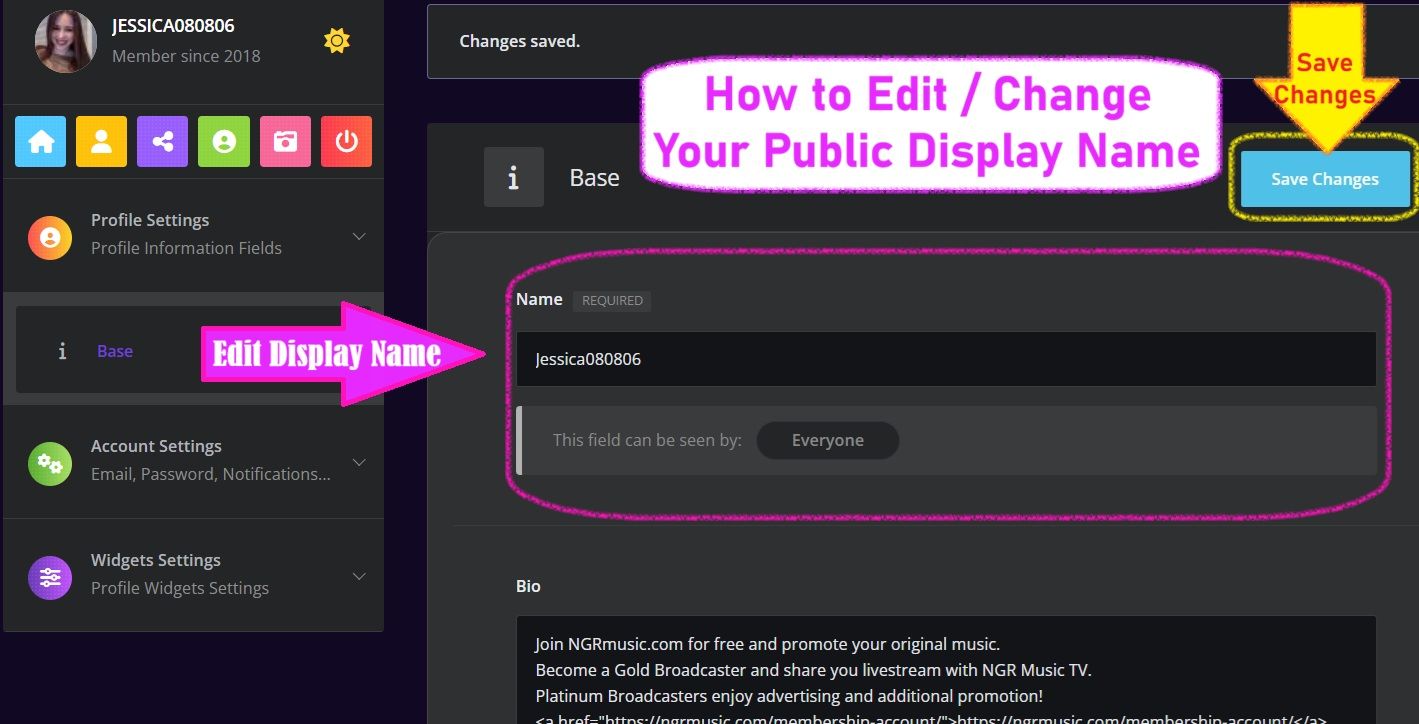
After adding your photo and bio, don’t forget to set your “Display Name” under Edit Profile
—it’s what shows everywhere (forums, NGR Music TV comments, etc.). Make it searchable and fun, like your DJ handle or artist name. Your display name is also known as your profile name on NGRmusic.com and will be publicly displayed even if your profile is set to private. This will be the name that anyone that visits the websites will see.
The name is the one you will be using for any profile posts, blog post, forum, or group comments. This includes the video pages as well. You do have the ability to change your name later if you would like but it’s usually best to pick one and stick with it so that you are recognizable to your friends and followers.

Add your Link in Bio
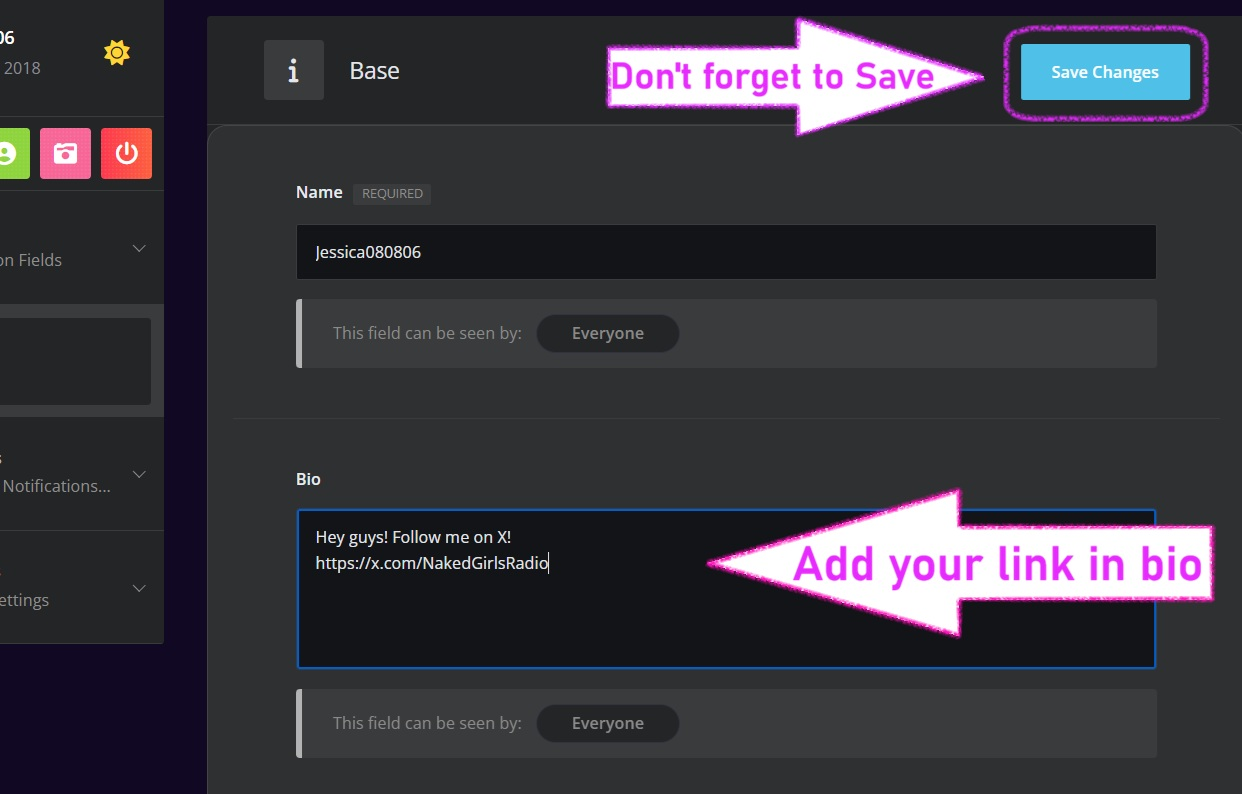
Also, link your socials (X, SoundCloud, etc.) in the bio field
—hyperlinks work, and it helps fans find your mixes quicker! There are multiple ways to add social media links to your profile information. I will go into more depth on those options in a future post. For now, this is the quickest and easiest method to add a link in your bio. No html code is required. The link will render on your page automatically once it saves and will be readily clickable. It is recommended to limit the number of links.
Too many links from a page can actually de-value the page so choose your links wisely. You want your profile page at its best so that you generate maximum traffic to your profile. Be sure to add plenty of original text to your bio as well. Give it some thought. Don’t just copy/ paste the same old bio you use everywhere else. Make your NGR bio fun, fresh and exciting!
On membership:
If you’re eyeing Gold or Platinum for more livestream visibility and promo perks, the upgrade process is super smooth via PayPal/Stripe.
Pro tip:
Start with the basic tier to earn Radio Gems daily
(log in, post in Introductions or Challenges, or reply here on this post)
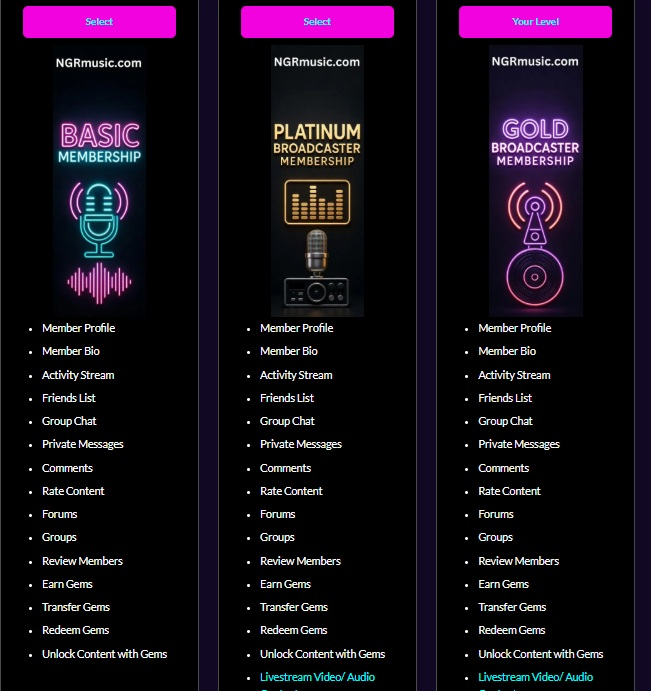
Choose Your Level:
Basic Member – $1.99/month
Build your presence with essential social tools:-
Custom member profile and bio
Activity stream, friends list, and group chats
Private messages, comments, and content ratings
Review members and rate content
Earn, transfer, and redeem gems to unlock exclusive rewards
Unlock content with gemsGold Broadcaster – $14.99/month
Everything in Basic, plus pro broadcasting perks:-
Livestream video/audio content directly on NGRmusic.com
Create sitewide blog posts
Upload videos and TV show clips
Add your tracks to song pages and musician directories
Monetize your streams and content
Priority support from the NGR teamPlatinum Broadcaster – $29.99/month
The ultimate level for maximum visibility
— all Gold features plus:-
Website banner advertising for your channel
Your custom pre-recorded video ad (up to 1 minute) aired on NGR TV
Priority play for your uploaded music videos on airRadio Gem Redemption
Check the Redeem page often; thresholds are low!
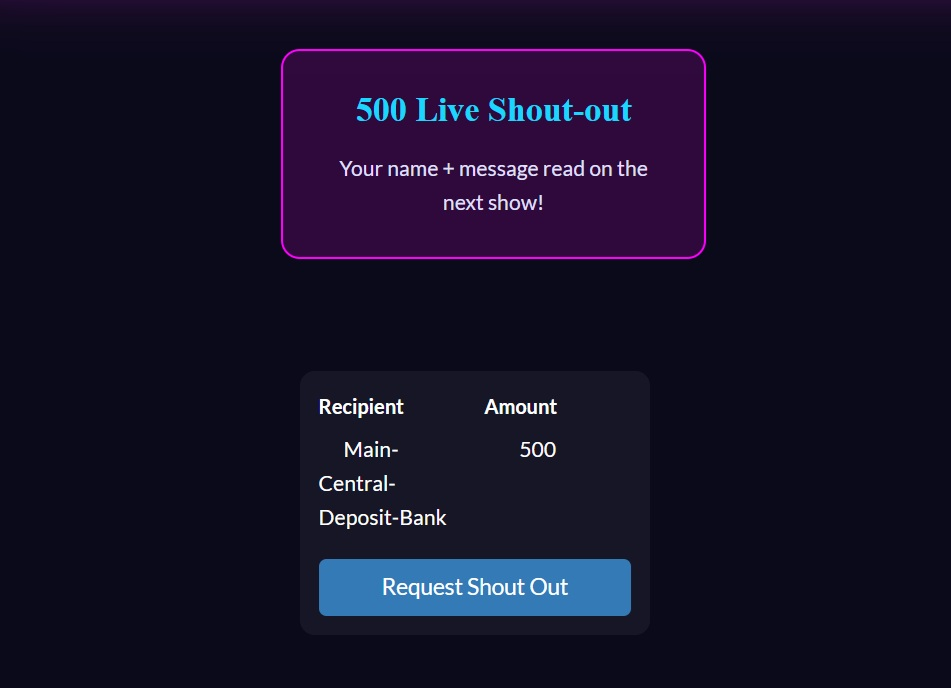
500 Gems: Live Shout-out
– Get your name and custom message read live on the next show!750 Gems: Priority Song Request
– Jump your favorite track straight to the top of the queue.1,000 Gems: Top Supporter Badge (30 days)
– Show off an exclusive neon badge next to your name.1,500 Gems: Exclusive Monthly Mixtape
– Receive a private download link to fresh indie bangers, emailed instantly.2,500 Gems: 15-Min Private Discord Hangout
– Join a voice chat for any topic you want!5,000 Gems: Guest DJ One Song
– Pick any song and hear it announced live on air.For uploads/wall posts:
Status Updates
When posting to your profile wall, use the “Embed” option for YouTube/SoundCloud links
—it auto-previews your mix clips nicely.
For photos, batch upload 5-10 at once for your artist gallery
—square formats (1080×1080) look cleanest on mobile.
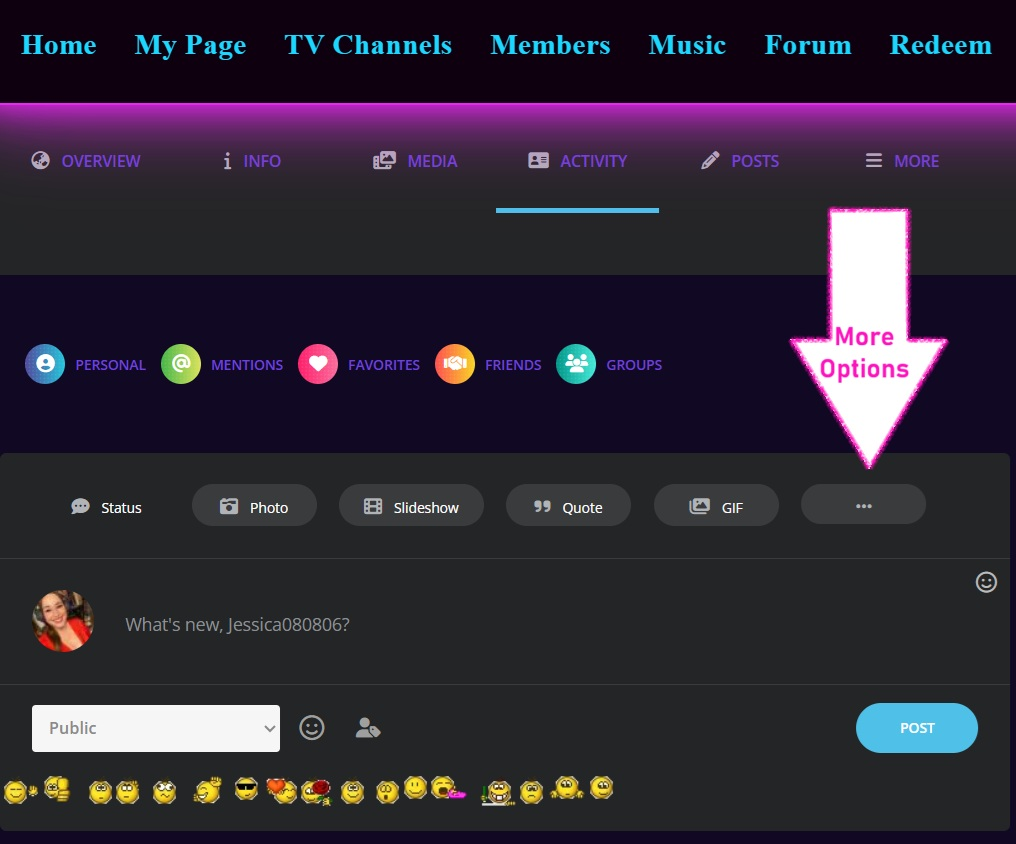
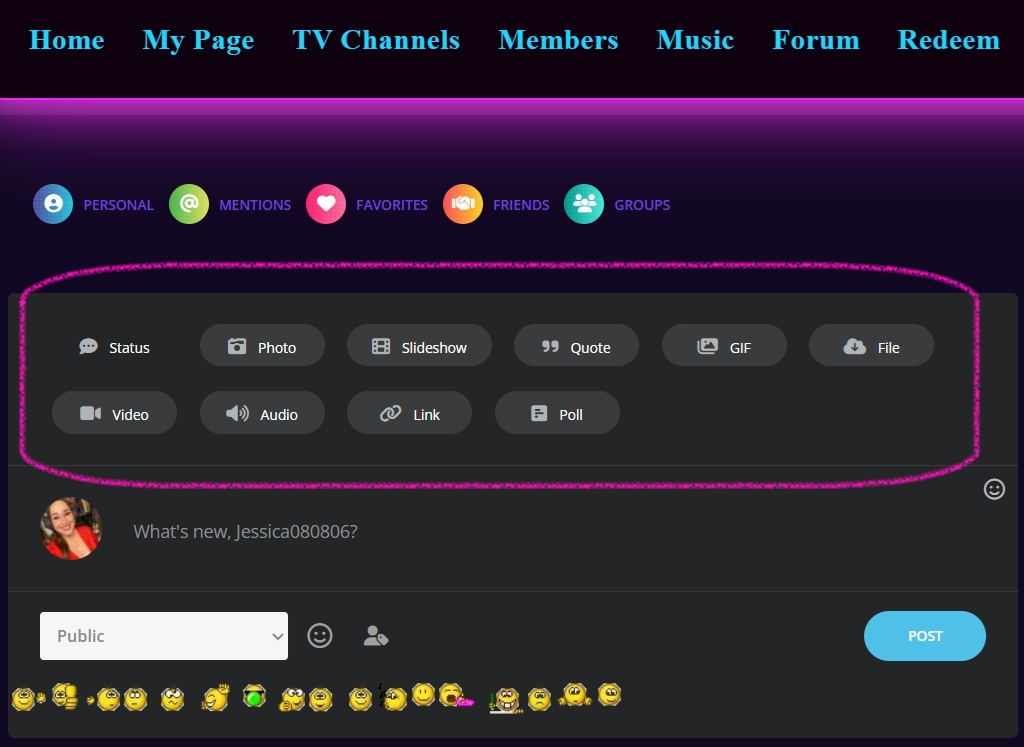
When posting a status update to your profile page / wall you will see several different options of items you can post besides plain text including photos, slideshows, quoted and gifs. If you click on the 3 dot menu in the status updates box it will open up several more options and allow you to upload several additional file types.
After clicking on the 3 dot menu several new buttons will appear including video, audio, links and polls. I should mention that the videos here are smaller size videos. The file size upload limit of this video files added to status updates is fairly small. This is meant for short form content and videos under 10 megabytes. You can find free video compression tools available online. For larger videos you can either add them to your page using embeds or become a broadcaster member and you will then have the ability to upload larger video files in addition to being able to create blog posts sitewide to share them.
I will continue to add information to this page with all kinds of different things that you can do as a member of ngrmusic.com here on the website. If you have specific questions or need help with something, then please reply to this forum so that I can address your concerns as soon as possible. There is an extremely high chance that other people have the exact same questions that you do. By posting your questions you are helping many other current and future NGR website visitors and members to understand the site better. Thank you for your inquiries and contributions!
If anyone’s stuck on something specific (like embedding a live stream archive on NGR TV, troubleshooting Gems not showing, or why your wall post isn’t visible), screenshot it and reply here
—I’ll hop in with steps or tag a mod if needed. This thread is meant to grow with us!
Keep the questions coming
—let’s make sure every new indie artist/DJ/broadcaster feels at home on NGR from day one.
Much love, positive energy, and let’s crush 2026!

Attachments:
You must be logged in to view attached files. -
January 20, 2026 at 10:55 pm #122979
Hey everybody! I made a tutorial video today that shows one way to add or change your profile photo on NGRmusic.com. Log in to the website and follow these super simple steps to get your profile picture up now!!
Add or Change your NGR Music Profile Photo

-
This reply was modified 1 month, 2 weeks ago by Jessica080806.
-
This reply was modified 1 month, 2 weeks ago by Jessica080806.
-
This reply was modified 1 month, 2 weeks ago by Jessica080806.
-
This reply was modified 1 month, 2 weeks ago by Jessica080806.
-
This reply was modified 1 month, 2 weeks ago by
-
January 20, 2026 at 11:26 pm #122984
There are a few different ways to add or change your profile picture on NGRmusic.com. In my opinion this is probably the easiest way to do it. Which way have you tried and what works best for you? Let me know by responding to this post. Here is the video. I hope you find it to be helpful. Thanks for watching and being a part of NGR Music TV!
-
This reply was modified 1 month, 2 weeks ago by Jessica080806.
-
This reply was modified 1 month, 2 weeks ago by Jessica080806.
-
This reply was modified 1 month, 2 weeks ago by
-
January 21, 2026 at 12:16 am #122987
NGR Music TV Website members can upload their profile photo using a webcam. This video shows exactly how to do this. Log in now and give it a try! It is super easy to take a selfie photo then upload and crop it instantly! Stay tuned for more how-to instructional videos related to the website. If you have any questions on how to use ngrmusic.com please log in and reply!
-
This reply was modified 1 month, 2 weeks ago by Jessica080806.
-
This reply was modified 1 month, 2 weeks ago by
-
January 21, 2026 at 12:41 am #122989
Need help coming up with a cover image for your NGR Music TV profile page? Give Grok AI a try! It is very helpful for things just like this. Watch this tutorial video and see how easy it is to get AI generated photos!
-
This reply was modified 1 month, 2 weeks ago by Jessica080806.
-
This reply was modified 1 month, 2 weeks ago by
-
-
AuthorPosts




- You must be logged in to reply to this topic.